SUBLET INVOICE CAPTURE AI-Sparkle-Blue-Yellow

Cut Sublet Invoice Entry Time up to 75%

Quickly turn vendor invoices into structured work orders in RTA Fleet360 with AI-enabled Sublet Invoice Capture. Reduce manual entry, improve accuracy, and ensure the details of every repair are documented in your fleet’s maintenance history.

Sublet Invoice Capture

Major Benefits

Manual Entry Icon

REDUCE
Manual Entry

Accountability

IMPROVE
Reporting Accuracy

Better Decision Making

BETTER
Decision Making

Upload

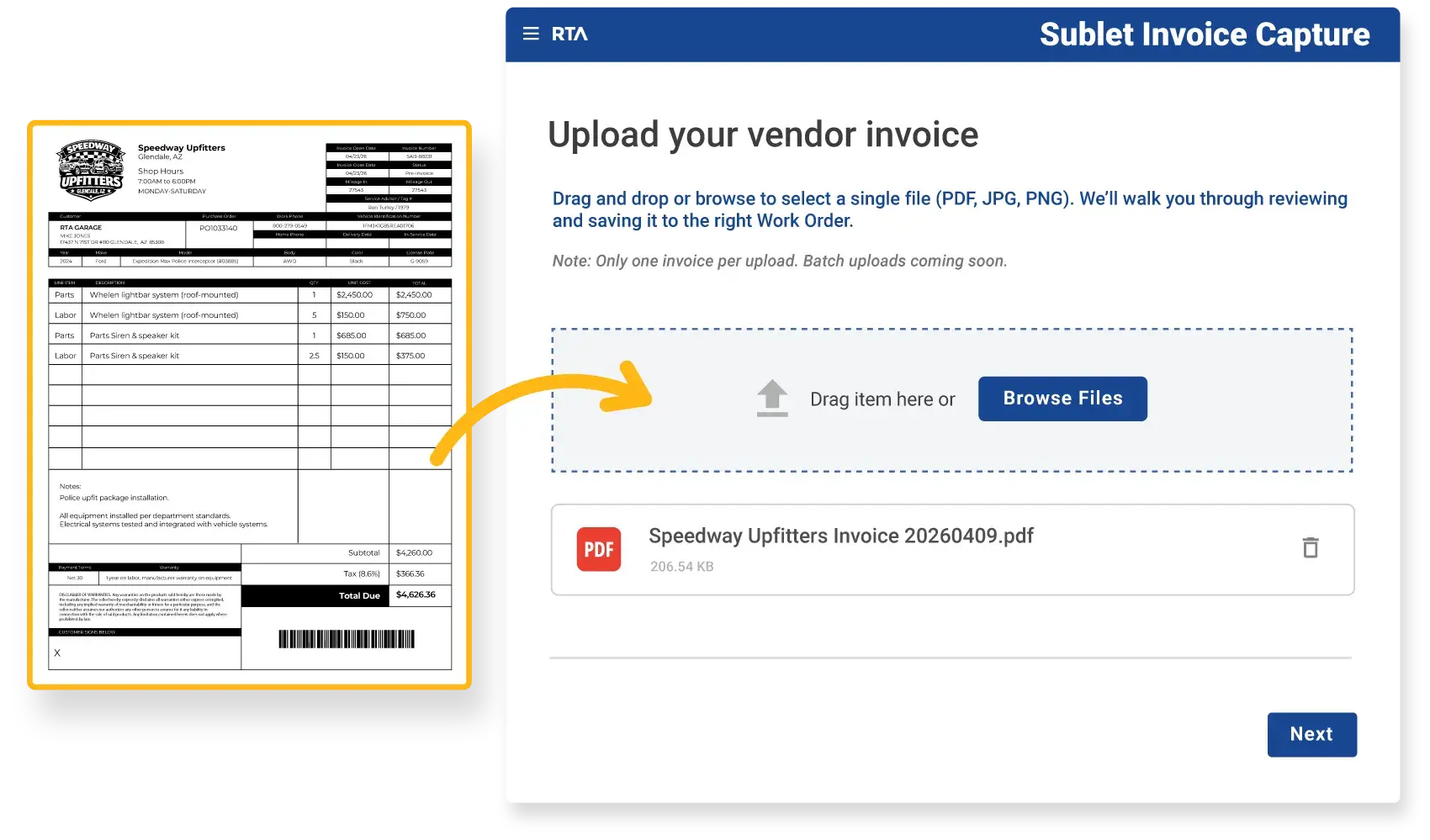
Upload a vendor invoice file and Sublet Invoice Capture will automatically read and extract the details, no manual entry required. Instead of typing out vendor and asset information, parts and labor details, and costs line by line, your team can move invoices into the system in seconds.

For fleets processing a large volume of invoices each year, that adds up to significant time saved.

Upload Invoice into Sublet Invoice Capture
03 - Sublet Invoice Capture - Review

Review

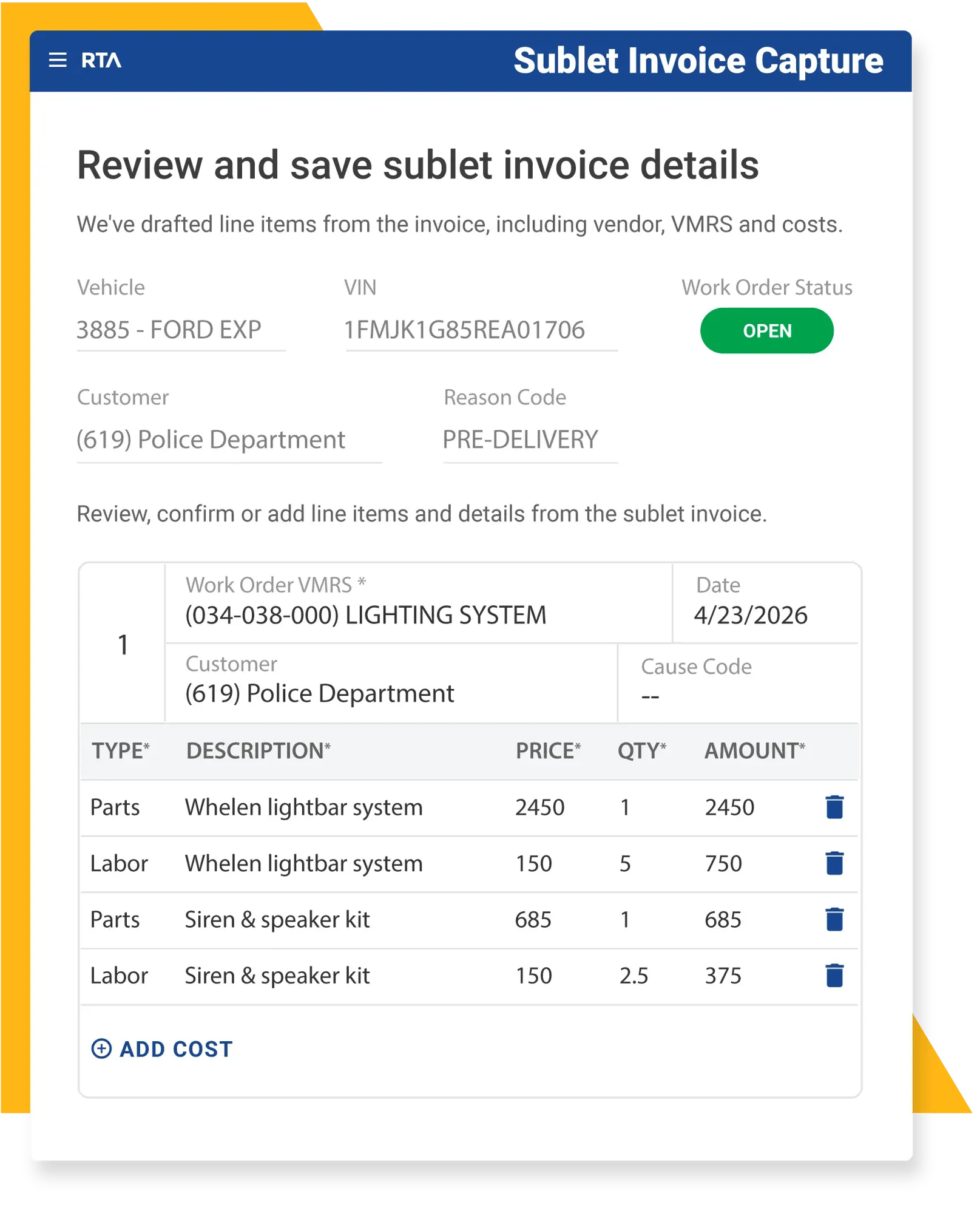
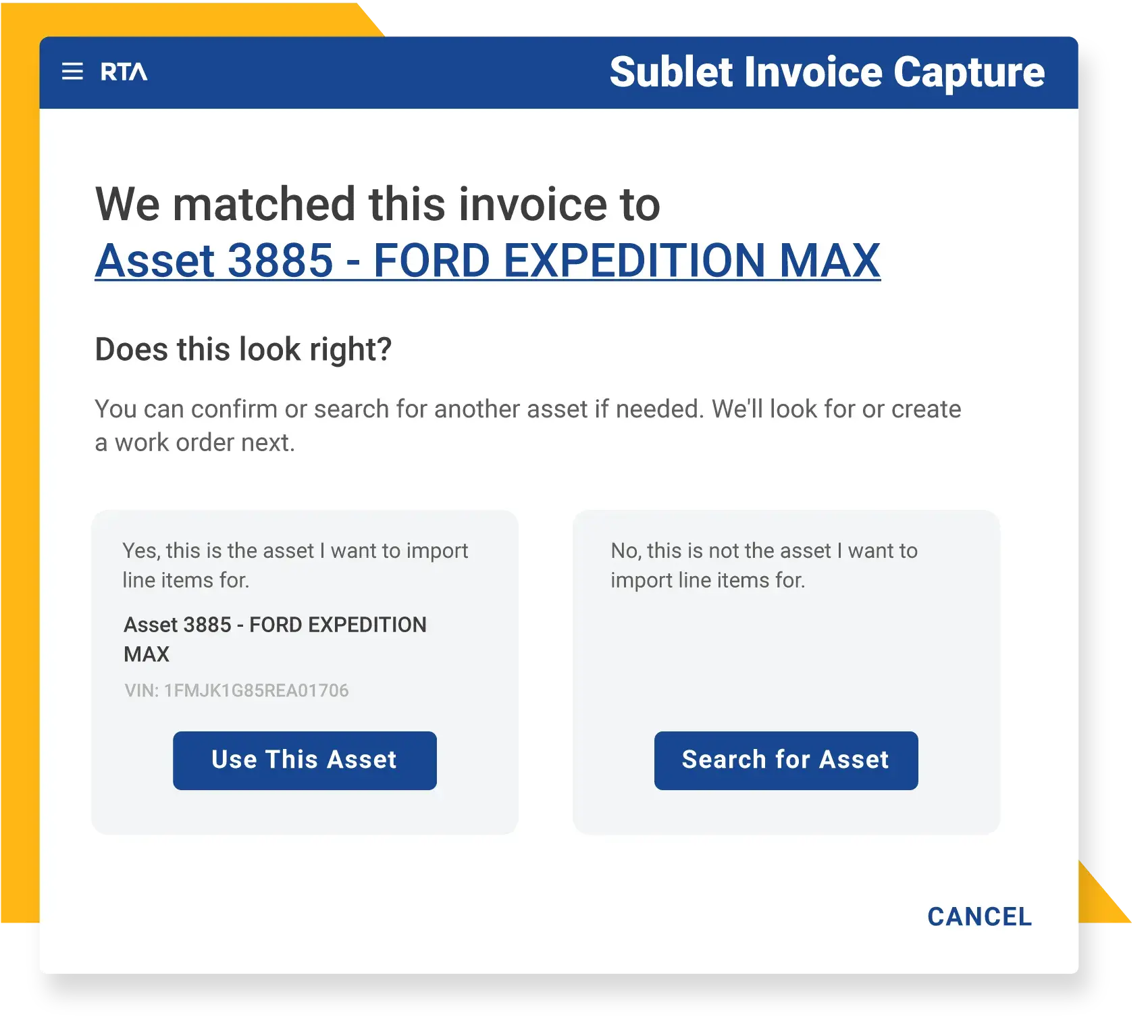
Once uploaded, invoice data is organized into a structured format and prepared as a work order tied to the correct asset. RTA Fleet360 scans your system for matching assets and open work orders, creates or updates a work order on the matched asset, and attaches the invoice to that asset.

Before creating or updating a work order, Sublet Invoice Capture flags any errors or warnings with a built-in review step. See what was extracted, make quick corrections inline, and confirm changes before saving. No data enters the system without your approval, so the work order reflects exactly how you want it recorded.

Save

When sublet work isn’t captured consistently, repairs get delayed, skipped, or lost. This creates gaps in your asset history and limits visibility into true costs, creating fleet blind spots.

Sublet Invoice Capture ensures every invoice is connected to the correct asset, so your records stay complete and outside work becomes part of your asset history. With accurate, complete data, you can evaluate repairs, track costs, and make confident decisions about budgeting and replacement timing.

02 - Sublet Invoice Capture - Review

CUSTOMER TESTIMONIALS

What Our Customers Are Saying

Sublet Invoice Process Graphic

Turn Sublet Invoices into Complete, Usable Fleet Data

The 4 Pillars of Fleet Success

See how Sublet Invoice Capture eliminates manual entry, captures every repair, and gives you the full picture of asset costs and history.

FAQs About Sublet Invoice Capture

Here are common questions fleets ask about the RTA Fleet360 Sublet Invoice Capture feature.

How does Sublet Invoice Capture work? expand_more expand_less
Upload a scanned or PDF sublet invoice, review the extracted data, and save it as a work order in RTA Fleet360. The system captures details like vendor, asset, parts, labor, and costs, then connects them to the correct asset record.
How accurate is the data extraction? expand_more expand_less
Sublet Invoice Capture is AI-enabled and recognizes common invoice formats. However, we recognize the importance of accurate data, so every invoice includes a review step. You can verify extracted data, make corrections, and confirm before anything is saved. No data enters the system without your approval.
What types of invoices can I upload? expand_more expand_less
Sublet Invoice Capture is intended to make the creation of work orders easier, so recognizes invoices for outsourced work or work done by outside vendors. Acceptable file formats include PDFs, JPGs, or PNGs.
Can I upload multiple invoices at once? expand_more expand_less
Currently, invoices are processed one at a time, however there’s no limit to how many you can capture overall. Once you’ve finished reviewing and saving one, you can quickly restart the process to upload your next invoice until that stack of vendor invoices on your desk is gone!
What happens after I save an invoice? expand_more expand_less
RTA Fleet360 creates or updates a work order tied to the correctly matched asset. From there, you can review details, make edits, close lines, or continue managing the work order just like any in-house repair. Alternatively, you could being the process again to upload additional sublet invoices.
How is this different from attaching an invoice to a work order? expand_more expand_less
Attaching a file stores the document. Sublet Invoice Capture uses AI to extract and structure the data into a work order with parts, labor, and costs that can be tracked, reported on, and included in asset lifecycle and cost analysis. Once the information has been saved, the original sublet invoice copy will also be saved as an attachment to the work order and asset record for future reference.
What happens if sublet invoices aren’t captured in RTA Fleet360? expand_more expand_less
When outside work isn’t consistently captured, gaps in asset history can go unnoticed until they create problems. Assets may appear cheaper to operate than they actually are, audits may require manual reconciliation, and decisions could be based on incomplete data. Sublet Invoice Capture ensures your asset records stay updated with full details.
RTA Leading Fleets Built Here Since 1979

Ready to manage your fleet with confidence?